
Day 2: Keyword Research: Find What Your Readers Search For (Substack SEO Challenge)
A beginner-friendly guide to finding keywords for your Substack posts, understanding search intent, and choosing topics with SEO potential.

Welcome to Day 2 of the Substack SEO Challenge! ✨
Missed Day 1? Catch up here:

Today we’re focusing on keywords - how to find what your readers are searching for and use those insights to create more discoverable content.
Now, many people think SEO is all about keywords. But there’s something even more important than that - search intent.
What is Search Intent
This is the question behind the keyword. The reason someone typed something into Google (or an AI tool).
And this is where you come in with your helpful content. Keywords just help us get it right in front of the people looking for it.
If you are teaching anything online, for every post that you want to optimize for SEO, you should be asking yourself this:
“What is someone hoping to find when they search this phrase?”
Then make sure your article gives them exactly that.
Let’s look at some examples.
If they are typing ‘create a Substack account’, they want to take action so you can quickly share the steps (I like adding screenshots too).
If they google something like ‘best email platform for writers’, then they want to compare options. You can write a comparison guide and share different tools, and your experience with any of them.
If instead they write ‘Flodesk pricing’, they are a bit ahead in their research and are almost ready to invest in a tool. (Using Flodesk as an example as that’s the one I’m using for my blogging business).
If they type ‘things to do in Rome in 3 days’ in Google or ChatGPT, they are planning a trip and any recommendations that fit into this window of time would be helpful to them.
If a new parent searches for ‘how to potty train a toddler’, they want parenting advice.
If the search intent is ‘why is my YouTube channel not growing’, they have a problem to solve and your post can help with that if it shares the reasons why + actionable ways to solve this issue.
And so on. You get the point.
People search for information online because they want to learn something, solve a problem, take action, answer a question, etc.
Your job as a writer is to figure out which one it is and create content that satisfies that need. That’s also what search engines and AI tools are looking for, so it literally benefits everyone involved.
Now that you understand search intent, let’s talk about keywords.
Keywords 101
A keyword is simply a word or phrase someone types in Google or AI when they are looking for something.
Knowing the keywords people use helps you understand the language they are using so you can make your content speak directly to them.
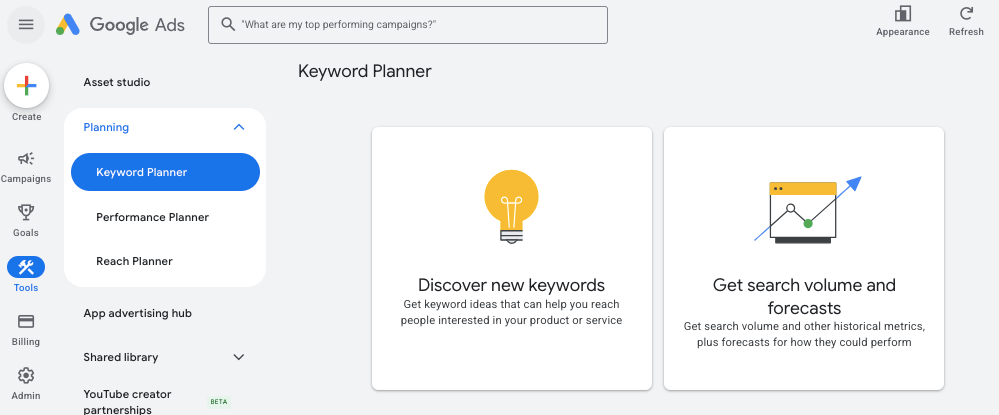
There are many tools that help you find keywords, but one I’ve always been using is Google Keyword Planner. It’s free.
Let’s try it together.
Getting Started with Google Keyword Planner
Set up a Google Ads Account here. (Don’t worry. That doesn’t need to have anything to do with ads.)
When asked if you want to run a campaign right away, pick ‘Switch to Expert Mode’ instead and ‘Create an account without a campaign.’
Access Google Keyword Planner (Go to ‘Tools & Settings’, and under ‘Planning’ choose ‘Keyword Planner’.)
Don’t see Expert Mode?
It might be that:
Many new Google Ads accounts no longer see “Switch to Expert Mode” immediately. They changed the onboarding flow.
The Google Ads account isn’t fully set up yet. Sometimes Keyword Planner isn’t available until the account setup is complete.
Possible solution:
Try going directly to Keyword Planner from Google Ads → Tools → Planning → Keyword Planner.
If you can access it, no need to worry about Expert Mode.
If Google forces you to create a campaign, you can create one and pause it right away (you don’t need to run ads).
And here’s how keyword tools work:
You type in a topic related to your niche and the tool shows you the exact phrases people search for together with related ideas.
You don’t need to obsess over the exact search volume (not anymore, at least). Instead, use it as a way to find questions and topics that match what you already want to write about.
Let’s try.
1. Once you have access to the Keyword Planner tool, go to ‘Discover new keywords’.
I just typed budgeting, and here are the results.
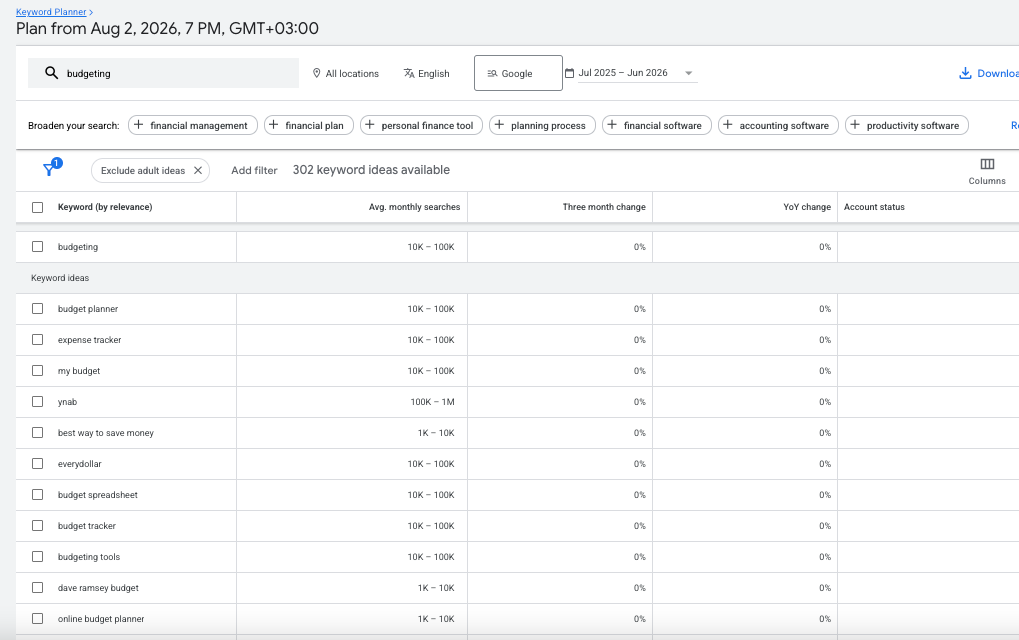
If that’s your main topic, then it makes sense to cover every angle, every detail and answer the main questions people have around it. This list gives you some ideas.
You don’t need to just optimize for budgeting or the other ones of the top keywords on the list because they are competitive, but you will still cover these topics and use these words + any synonyms throughout the content.
I went to the next page, scrolled down and saw some less competitive terms. Each of these can be a new post idea for you.
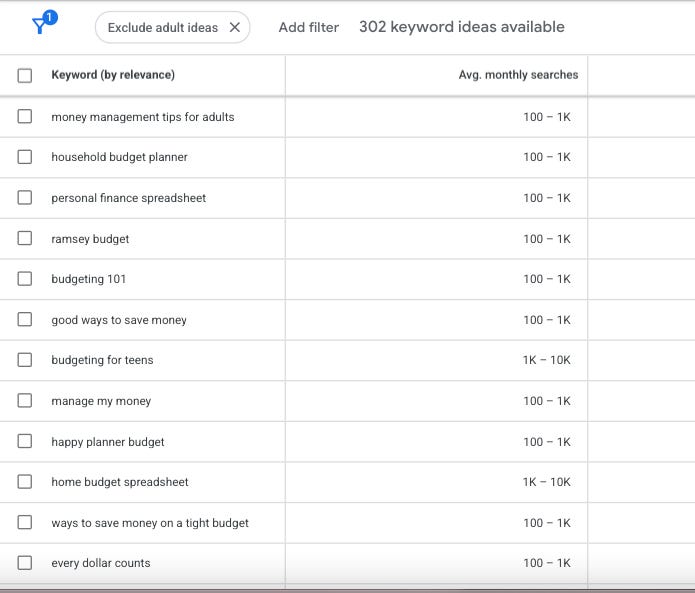
How to think when choosing a keyword:
Not every keyword might be worth writing about. It’s important to keep a few things in mind, such as whether:
this is something your ideal reader would actually search for (you know them best!);
you can answer it differently than most other posts on the topic out there;
you have experience or expertise on this topic.
If the answer is yes, you’ve probably found a good keyword/topic.
Long-tail keywords
As you can see from the screenshots, some keywords are very broad (like budgeting). Others are more specific (eg: grocery shopping on a budget).
In SEO, these are called long-tail keywords and they are usually easier to rank for.
They answer one clear question or solve one big problem and you can write a post around that. It’s okay to add more to the post, of course, and share many more tips. But make this keyword the main point (plus, add it to the title) if you’d like to rank for it.
We’ll talk about how to actually use the keywords inside your content (meaning, optimizing a post around a chosen keyword) tomorrow! Hope to see you for Day 3 of the Substack SEO Challenge.
🎯 ACTION ITEMS
#1: Find 10 keywords.
Open Google Keyword Planner and search for one topic in your niche.
Save 10 keyword ideas that you’d genuinely enjoy writing about.
#2: Pick one and turn it into a post idea.
Choose one and decide what post you can write about it.
[bonus] #3: Look at the top 3 Google results for your keyword.
What are they missing? How could you make your version more helpful?
Type it in any AI tool and see the answer as well as the sources it links to.
This is an example of how you prepare to write a quality post, how you build authority in your niche and stand out in the search results.
So, what’s your keyword, and what post could you write around it?
I wish I had this to read when I was first starting out. This is SEO and search internet understanding gold. I’ll be forwarding to my team so that everyone benefits 🤗
This is wonderful. Can't wait to dive into Google keyword planner!! Thanks for these insights. ♥️