
Your Substack About Page Checklist (Don’t Publish Without This)
Turn casual visitors into loyal subscribers with one page

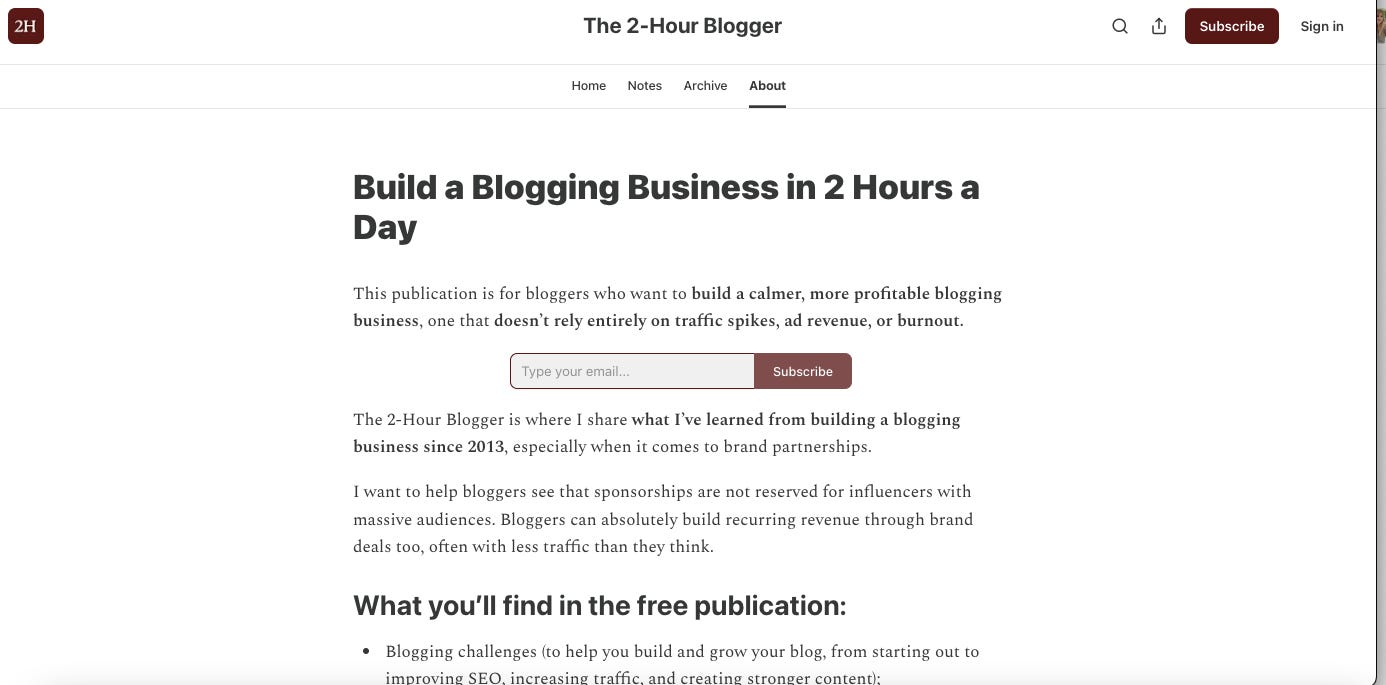
I just updated the About page for my main Substack publication The 2-Hour Blogger. And one of the many opportunities new writers miss out on is exactly this - making the most of your About page - so I thought I’d share some tips and hopefully inspire you to revamp yours (or write it now if you haven’t already).
First, let’s talk about why it matters.
Why your About page actually matters
It’s where strangers decide if your writing is for them.
It’s one of your best sales pages and it’s your chance to share with potential subscribers what your newsletter is about, who you are, and why it’s worth subscribing.
This is also where you can share your story in a way that resonates with your ideal subscribers, and list what your free and paid newsletter includes so there’s no confusion.
It can be short or long, but the point is to use that chance and speak directly to your ideal reader - the person you can help the most, who can actually benefit from your writing, and who’d love to know more about you.
It’s a way to gain trust, make a good first impression, and actually convert readers into subscribers.
The biggest mistakes new writers make
1. Not updating the About page at all.
Many new writers on Substack use the default version of their About page and never update it, never customize it, never share their story.
If that’s the case for you too, I hope this post helps you take action.
2. Writing about yourself instead of the reader.
Another big mistake is to only write about yourself, instead of thinking about the reader first.
It’s great to share your story, of course, and to lean into your expertise or get personal. But this page exists for the reader, so first you can share how your content solves something for them, after which you can dive into your journey.
Start with the reader’s problem or goal, and then position yourself as the guide. Finally, share your story as proof.
3. Losing the reader in the first few lines.
If the reader doesn’t feel seen from the first few lines, they might quickly lose interest or think this is not for them and stop reading. So use the first paragraphs to summarize how your publication will benefit them and why they should subscribe.
4. Being vague about the benefits they get.
The About page of your Substack newsletter is also a place to get specific about outcomes. Tell the reader what they get and what changes for them.
This is where clarity comes. They shouldn’t wonder what’s included in your newsletter, whether it’s the right one for them, or what topics you cover exactly.
5. Not making it easy to subscribe.
I see big publications adding a Subscribe button early on, so I did the same. And also include more than one, use clear call-to-actions, and just make it as easy as possible for readers to subscribe.
Now, let’s write that About page. For that, please let go of perfectionism first.
You just need the first draft ready. You can always come back to it and update it, especially as you learn more about Substack, get more clear on your messaging and get to know your ideal subscriber/reader more.
Your Substack About Page Checklist
You can check out my new About page here. I’ll walk you through the elements I included.
You can always create your own version of it, of course. Make it shorter or longer, whatever feels right for you. You can also re-organize the elements below, switch the Subscribe buttons or include fewer, and anything else.
This is just a quick template you can use if you need some guidance:
1. Clear positioning headline
Does your title clearly state the transformation or focus?
Is it specific (not generic like “welcome to my newsletter”)?
Does it instantly signal who it’s for?
My current one is: Build a Blogging Business in 2 Hours a Day
2. Reader-focused opening
Does the first paragraph describe who this is for?
Does it highlight a problem, goal, or desire?
Is it free from unnecessary personal story at the start?
Ask: Would a reader immediately feel “this is for me”?
My first paragraph is this: This publication is for bloggers who want to build a calmer, more profitable blogging business, one that doesn’t rely entirely on traffic spikes, ad revenue, or burnout.
3. First Subscribe button
4. Simple value explanation
Get into a bit more detail about what the publication is.
My section looks like this:
The 2-Hour Blogger is where I share what I’ve learned from building a blogging business since 2013, especially when it comes to brand partnerships.
I want to help bloggers see that sponsorships are not reserved for influencers with massive audiences. Bloggers can absolutely build recurring revenue through brand deals too, often with less traffic than they think.
5. Free content section (what free subscribers get)
Do you list specific types of content?
Is it clear what someone gets without paying?
Are topics grouped clearly (not random ideas)?
6. Paid subscription section (what they get + why it’s worth it)
Is the paid tier clearly differentiated from free content?
Do you explain exact value, not just “exclusive posts”?
Do you include outcomes like income, access, systems, or behind-the-scenes?
7. Second Subscribe button.
8. Your credibility section (+ photo)
Do you briefly explain who you are?
Do you include relevant authority or experience?
Is your story focused on relevance, not biography?
Keep it focused on:
experience
niche shift or expertise
why you teach this topic
Adding a photo of you is a plus, in my opinion.
[optional] 9. Why this publication exists
Maybe you already covered that above. If not and if you feel like adding more details, this is a good place for it.
[optional but powerful] 10. Core belief section
Some of the ones I included are:
Blogging is not dead.
Sponsorships can be recurring revenue for bloggers.
Your blog’s authority is way more important than page views.
You can work 1-3 hours a day.
11. CTA sections (free + paid) + Subscribe button
Is there at least one clear subscribe button early?
Is there a stronger CTA for paid subscription later?
Does the CTA match the value promised above?
At the end of my About page, I list one more time all the perks for paid subscribers and add a button with CTA ‘Unlock premium posts’.
Before publishing, ask yourself these questions:
Is it obvious what this Substack is about in 10 seconds?
Is it clear who it’s for?
Is the paid value easy to understand?
Would a stranger know whether to subscribe or not?
Last but not least, know that your About page should evolve as your Substack grows, so don’t forget to come back to it and update it. The same goes for your welcome email to subscribers, and all the other elements of your newsletter.
Share your About page below.
It’s your turn now.
Update your Substack About page and share it below.
Let me know if this article was helpful and what else you’d like me to cover next.