
Day 3: Optimize Your Substack Posts for More Visibility (Substack SEO Challenge)
Optimize your Substack posts step by step with simple on-page SEO strategies that help readers discover your work, while keeping your unique voice intact.

Welcome to Day 3 of the Substack SEO Challenge! 🚀
Missed Day 1 and 2? Catch up here:


I received some amazing feedback for the challenge so far. How is it going for you?
Today’s focus is one of the biggest SEO opportunities: writing Substack articles that help the right readers find your work.
I want to keep it simple. There’s no need to learn everything about SEO, or even every detail about the different elements that can be optimized on a page (That’s called on-page SEO, by the way. Off-page SEO, on the other hand, is about the actions you take outside of your website/Substack, such as building backlinks, sharing on social media, getting featured on other sites, and so on).
More theory is not always the answer. Instead, I will simply tell you how you can make your post more search-engine friendly (without compromising on value and authenticity).
If you took the action steps from the challenge so far, you must have a list of keywords you’d like to create articles around.
If you picked one and have a post idea for it, feel free to write the piece.
When it’s written, you can follow the steps below (take only what resonates, please).
What you need:
your keyword;
the post you just wrote and which you want to optimize;
other related keywords (get these from Google Keyword Planner);
synonyms of the keyword (also use the tool for that).
The Building Blocks of an SEO-Friendly Article
Title - add the keyword phrase here. If it sounds off, don’t be afraid to tweak it. Every SEO article out there will tell you to have the exact phrase in the title as it’s important for ranking it, but we can’t really have a weird title that turns people off. ChatGPT really helps me with title ideas, so feel free to get help from AI tools. As you’ll see below, you can also create another title specifically for search engines.
Subtitle - paste your whole text in ChatGPT (or any other tool you use) and ask it to come up with a few subtitles, ideally including a version of the keywords and/or synonyms.
Keyword placement - add it somewhere in the beginning (opening paragraphs) and in the end of the article (the conclusion). Include other versions of it + synonyms throughout the text, naturally (this varies depending on how long the text is).
Headings - your headings in the article will always be H2, H3, H4, etc. - in that order. Your actual title is already H1. That’s heading hierarchy. With H2, you mark main sections, and H3s are for supporting points. Have the keyword in one of them if possible. You can also include synonyms in others, if it sounds natural.
Readability - use visuals, short paragraphs, clear headings and bullet points to break up long sections of text. A well-structured article is better for readers and helps search engines understand your content.
Substack SEO Options
There’s a hidden gem in your article settings that many writers overlook, so let’s take a look.
When you’re using the Substack editor and preparing an article for publishing, click Settings. Scroll down and expand the SEO Options tab.
This is where you can update the title, description and URL.
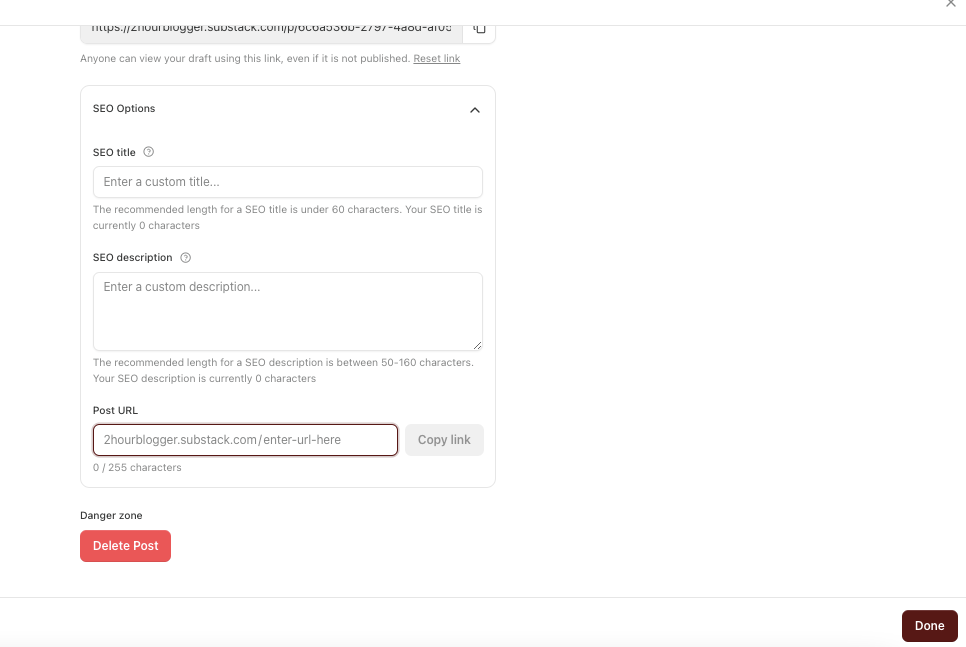
SEO title - this is your chance to write a more optimized title. It’s also possible that the one that’s best for Substack is too long for search engines, so this is your chance to shorten it.
Meta description - this is your summary of the article. Include your main keyword naturally and give people a reason to click the link and read the post.
URL - this is the web address of the page, and you can customize the part that appears after your substack.com domain. Keep it short and leave the keyword. You can remove unnecessary words like prepositions to make it cleaner.
Below are the action items for today. After that, behind the paywall, I included a little something for the paid members - an example of how I’ve optimized one of my articles (with screenshots), plus one SEO practice to avoid.
🎯 ACTION ITEMS
#1. Pick one article and optimize it for search.
Choose a new draft or an existing post you want to improve. Go through the checklist above and update the title, subtitle, keywords, headings, and readability.
#2. Review your Substack SEO settings before publishing.
Open the SEO Options section in Substack and optimize your SEO title, meta description, and URL.