
Day 4: How Internal Linking Helps Your Substack Grow (Substack SEO Challenge)
A simple guide to connecting your Substack posts, helping Google discover your content, and giving readers more reasons to keep exploring.

Welcome to Day 4 of the Substack SEO Challenge.
Just joining? Catch up on the previous days here:
The topic today is internal linking, which means adding a link from one article on your publication to another one on the same publication.
That’s one of the most important concepts in SEO, and it’s a pretty simple thing to do, and yet most people aren’t doing it.
So let’s first talk about why it matters, before we get to the action part.
Why Internal Linking Matters
There are many benefits. Let me group them into 2 categories.
1. You help Google discover your posts.
Google uses links to discover and understand pages online, but also how they relate to each other. That includes links from other sites/publications, but your own internal links matter too.
By linking from one page on your site to another, you show search engines what your publication is about. This is especially useful for newer posts that don’t have enough links pointing to them yet.
And when you do this consistently, you show search engines which pieces of content are connected, how they are connected, and that you cover a subject in depth.
That builds topical authority - you become the expert on a specific topics.
2. Keep readers on your publication.
This is where things get really practical, and super useful for your readers.
By linking to older posts, you help readers take the next logical step, or learn more on the subject, or discover content they would have otherwise never seen.
That means you get to provide extra value to them, keep them engaged with your content longer, and that increases the chances of turning them into subscribers and loyal readers.
In addition, some of the important metrics you should be checking out in Google Analytics are page views, bounce rate, and time on site. Internal linking helps improve all of these as it gives readers a chance to engage with your content, check other pages on your publication and stay longer on the site.
Example
Let’s say you’re in the Home Decor niche, and are writing an article on how to make a small living room feel bigger. In it, you mention choosing the right living room color palette.
You’ve already published a post on this exact topic, so now is the moment to link that phrase to the older article.
If readers want to learn that too, they will click and read. If not, they can just ignore it.
At the same time, this helps search engines understand that these 2 articles cover related topics.
It’s also helpful to you as when writing an article, you don’t need to explain the same things over and over again about different points, but can link to articles you’ve written related to that.
Think of your publication as a connected network, not just individual posts.
To summarize, thanks to internal links, you:
help Google discover your posts;
help Google understand them;
create topical authority;
give newer posts a boost;
get readers to discover older posts;
help them navigate your publication;
are more likely to turn readers into subscribers;
don’t need to explain the same things over and over but can just link to what you’ve covered already in previous posts.
Best Practices
Internal links need to be related. - Don’t just add links for the sake of doing it. Only add when relevant. And if you don’t have any relevant ones, maybe you’re covering too many topics and that confuses the reader.
Link naturally. - When you feel like an internal link can be added and will benefit the reader, add it. Use the anchor text (the clickable text in a link) that feels natural and is part of the sentence.
Sometimes, I like to add the internal link as a resource below the text. I can write this below a paragraph/section: Read More/Further Reading + the title of another post and a link to it.
Another type of internal link is the call to action. When you mention an affiliate product or your own, other offers or just want readers to subscribe or go to another page, you can simply tell them to click there and link that to the page you want to send them to.
Always be helpful. - Don’t forget why we do what we do. Value comes first.
And finally, keep in mind that internal links don’t guarantee you higher ratings in search engines. That’s just one of the many signals Google looks at when analyzing and ranking pages online.
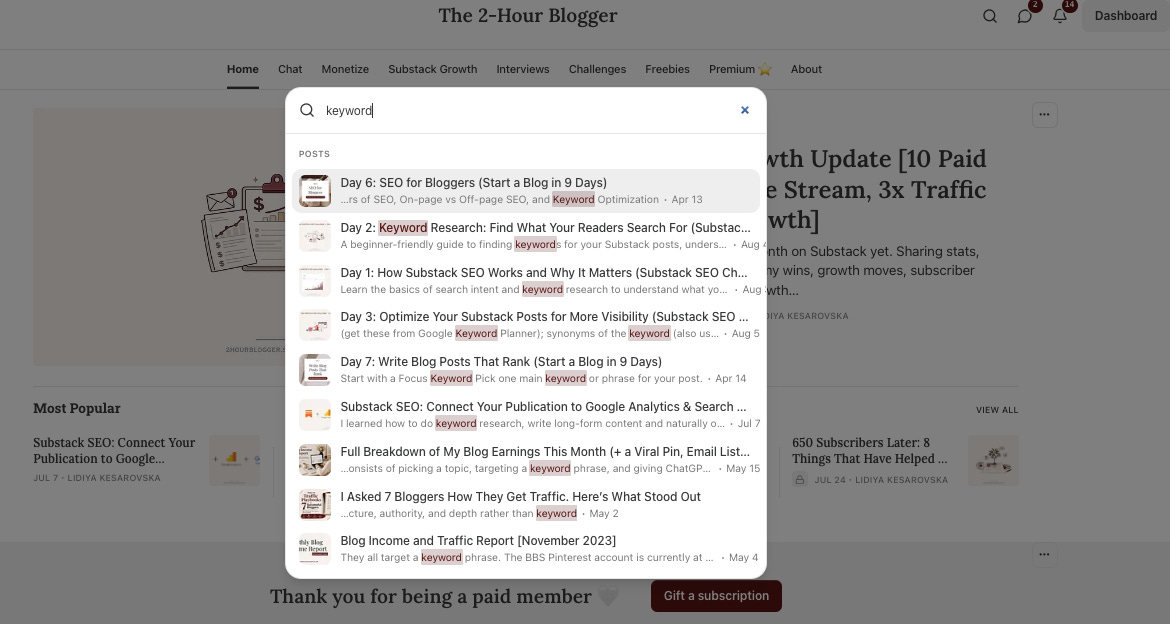
Wondering how to browse your archives easily for related topics? Just head to your publication, click the search icon and type a keyword. Related posts will show up.
🎯 ACTION ITEMS
#1 Update your latest post.
Go to your last article and add 1-3 internal links to older posts.
#2. Link to the new article from older content.
Also do the opposite because the new post needs internal links from older content. Go back to 1 or 2 pieces from you archives (related ones), and link from them to the new post.
#3. Turn it into a regular practice.
This is the real work. Going forward, make internal linking part of your publishing routine.
And if you’re ready for extra homework, go to all your existing posts and add internal links. Even 1 or 2 is enough.
I hope this helped.
I’m curious:
How many of your posts are currently connected through internal links?
I have actually already been linking related posts. Its good to know its benefit in relation to SEO.
I have been adding links to my articles for a while now.
I always thought it was a great way to show that I have already covered various (related) topics and to increase the perceived value of my publication. And hopefully keep people reading my content.
But I never considered the value from an SEO perspective.
Thanks!